As we move into 2026, the AI image generation market has matured with a variety of powerful tools. However, the term “free” often comes with caveats such as daily limits, long wait times, or hardware requirements.
Instead of endlessly searching for a single model that creates the best image on the first try, finding the right tool depends entirely on your specific needs and workflow. Here is a breakdown of the top free platforms available today.
🏆 Best Overall: Google Gemini
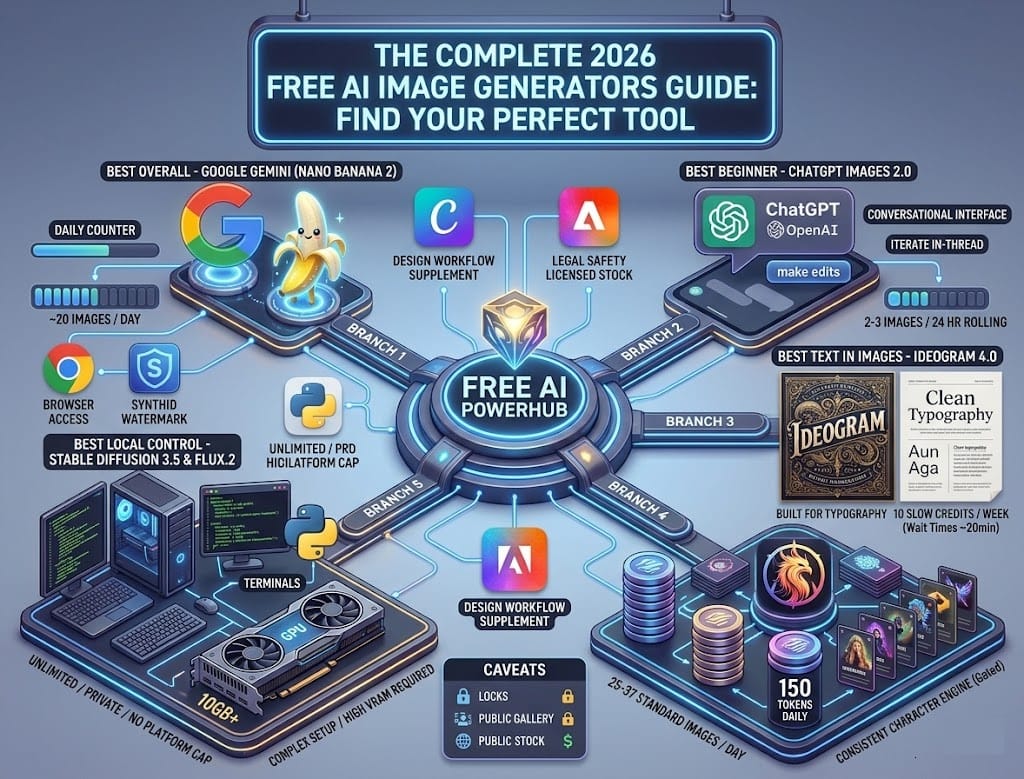
In 2026, Google Gemini (powered by the Nano Banana 2 model) stands out as the most reliable everyday choice.
- Why we recommend it: Unlike competitors’ complex “token” systems, Gemini offers a straightforward and clear allowance: roughly 20 free images per day directly in your browser.
- Pros: Highly stable, supports multiple languages, and requires zero technical setup.
- Keep in mind: All generated images carry Google’s invisible SynthID watermark.
🎯 Top Picks by Use Case
1. Best for Beginners: ChatGPT (Images 2.0)
If you don’t want to spend time learning how to craft complex prompts, ChatGPT is the perfect starting point.
- Pros: Natural, conversational interface. You can simply ask the AI to “change the shirt to blue” or “make the lighting warmer” in the same chat thread without starting from scratch.
- Limitations: Extremely strict daily limits (only around 2-3 images per 24 hours).
2. Best for Text Generation: Ideogram 4.0
Generating accurate text inside images (like posters, logos, or typography) is famously difficult for AI, but Ideogram is the exception.
- Pros: Exceptional, highly readable text rendering.
- Limitations: The free tier only provides 10 “slow” credits per week. During peak hours, you might have to wait up to 20 minutes for a single generation.
3. Best for Daily Volume: Leonardo AI
Ideal for users who need to experiment with multiple iterations and ideas continuously.
- Pros: Offers 150 tokens daily (enough for roughly 25-37 standard images). It also features advanced built-in editing tools.
- Limitations: Images generated on free accounts are publicly visible by default.
4. Best for Designers & Marketers: Canva AI & Adobe Firefly
- Canva (Magic Media): Perfect if you already work within Canva. You can generate an image and drop it directly into your presentation or social media post.
- Adobe Firefly: The safest choice legally. It is trained on clean, licensed stock data. However, the free version only offers a small monthly credit allocation with no rollover.
5. Best for Ultimate Control: Stable Diffusion 3.5 & FLUX.2
If you dislike the restrictions of cloud platforms, running an open-weight model locally on your PC is the way to go.
- Pros: 100% free forever, unlimited generations, absolute privacy, and zero watermarks.
- Limitations: Requires a complex technical setup and a powerful graphics card (GPU) with at least 10GB of VRAM.
💡 The Reality of “Free” Tiers
Before diving in, keep these typical trade-offs in mind when using free accounts:
- Queues and Speed: Systems like Ideogram or Bing Image Creator will throttle your speed once your “fast” credits run out, pushing you into long waiting lines.
- Privacy: Most cloud platforms (unless running locally) default to making your generated images public. Avoid free tiers for confidential client work.
- Commercial Rights: Always read the fine print. Some tools restrict free users to personal use only. Conversely, open models like Stable Diffusion generally allow free commercial use (typically for individuals or businesses under $1M in revenue).
Final Advice: Start with Google Gemini to experience hassle-free daily generation, and switch to ChatGPT when you need fine-tuned conversational edits for a specific image. If you are genuinely serious about high-volume AI art, investing in hardware to run Stable Diffusion 3.5 locally will be your most cost-effective strategy in the long run.