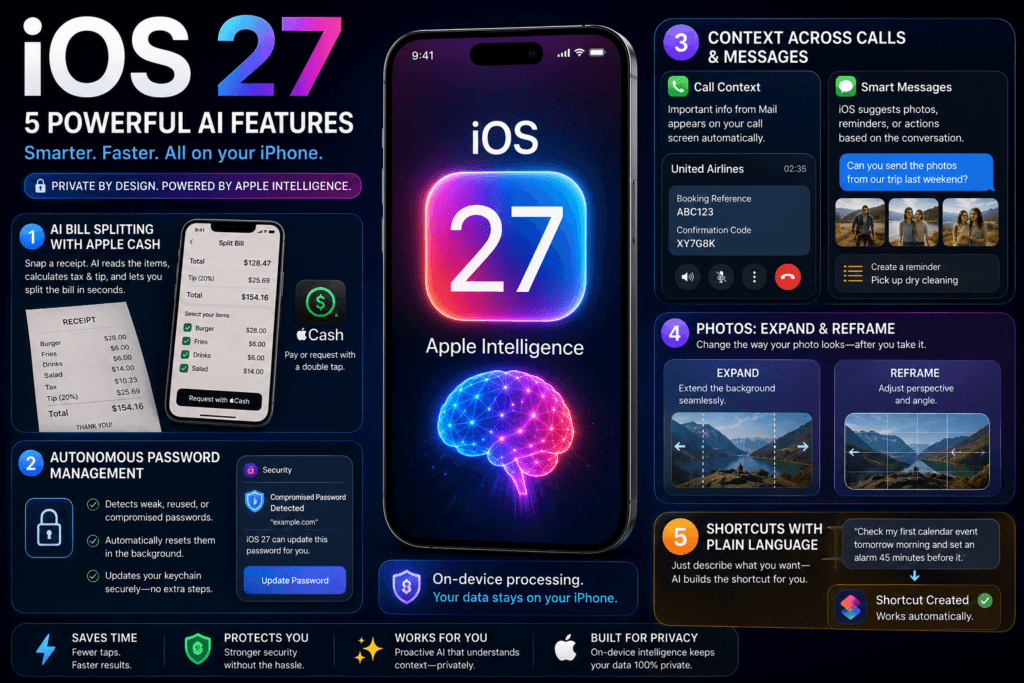
While Apple’s WWDC 2026 keynote naturally spotlighted a completely rebuilt, conversational Siri AI—complete with its own dedicated standalone app—the true brilliance of the upcoming iOS 27 update lies in the quiet, practical upgrades. Apple isn’t forcing you into endless prompt-and-response loops with a chatbot. Instead, it is seamlessly embedding Apple Intelligence directly into the core apps you open dozens of times a day.
From financial shortcuts to automated security, these under-the-radar features turn your iPhone into a proactive digital assistant, making the underlying AI nearly invisible—just the way it should be.
1. The Apple Cash Bill-Splitting Trick
Perhaps the most universally useful feature hitting the developer beta is the new AI-powered bill-splitting mechanism integrated straight into the payment ecosystem.
- The Workflow: You take a photo of a restaurant receipt. The on-device computer vision instantly reads individual items, calculates taxes, and appends the tip.
- The Benefit: Users simply tap the items they consumed and fire off a localized split request to a group chat. Recipients can reimburse with a swift double-click through Apple Cash. By handling the math and the transaction seamlessly, Apple effectively keeps users anchored inside its proprietary financial loop.
2. Autonomous Password Management and Leaked Credential Fixing
Apple is introducing an exceptionally bold upgrade to system security that removes the friction of manual password updates.
- Proactive Detection: The system continuously monitors your saved login data, flagging entries that are weak, repeated, or compromised in a known data breach.
- Autonomous Reset: Rather than just sending a passive alert, iOS 27 can now take the initiative. With user permission, the on-device AI will automatically navigate to the compromised website, log in, generate an ultra-secure alternative, and update your keychain credentials entirely in the background.
3. Contextual Integration Across Messages and Phone Calls
Instead of operating as isolated silos, native apps now share a subtle layer of localized context.
- Call Context: When you call a customer support line—such as an airline—the Phone app automatically pulls relevant data like booking references or confirmation codes directly from your Mail app and highlights them on your active call screen.
- Contextual Messages: If a contact messages you asking for specific media or requesting you to pick up an item, the device proactively surfaces the exact photos featuring those people, or generates a one-tap shortcut to log a new task in Reminders.
- Privacy First: Crucially, features like Call Context map metadata locally. It evaluates who you are calling rather than recording what you say, guaranteeing that personal information never leaves the physical handset.
4. Advanced Photo Reconstruction: Expand and Reframe
Building upon the ‘Clean Up’ tool introduced previously, the Photos app in iOS 27 introduces heavy-hitting canvas manipulation tools: Expand and Reframe.
- Expand: If a picture was captured vertically but fits a layout better horizontally, generative AI can seamlessly extend the background context outward to change the aspect ratio natively.
- Reframe: Leveraging spatial calculation models originally optimized for visionOS, this tool enables users to subtly shift the camera perspective or angle after the photo has been taken—effectively mimicking the ability to step back in time to adjust the composition.
5. Plain-Text Automation and Shortcuts
The Shortcuts app has historically been incredibly powerful but notoriously complex for the average user. iOS 27 addresses this with a new “Describe a Shortcut” interface.
How it works: Instead of manually stringing together conditional actions and variables, users can simply type an instruction in plain language. For instance, telling your phone to “automatically look at my first calendar event tomorrow morning and set my alarm for 45 minutes before it” causes Apple Intelligence to map out, compile, and configure the entire sequence instantly.
The Big Takeaway
Individually, these updates might seem like minor conveniences. Collectively, they represent a highly calculated retention strategy. By lowering the required number of taps and keystrokes needed to perform complicated, multi-app digital chores, Apple is making the iPhone ecosystem significantly harder for users to walk away from. The consumer rollout is slated for the upcoming public test phase, ahead of a full public release this fall.